Devops: Virtual Machines, Containers and Isolates
Tuesday, 18 August 2026
A deep dive into how VMs, containers, and isolates achieve isolation, and the tradeoffs of each.
Virtual Machines
A virtual machine is the virtualization or emulation of a computer system. Virtual machines can be differentiated by their function in two ways:
- System virtual machines: They provide functionality to execute entire operating systems. e.g. qemu
- Process virtual machines are designed to execute computer programs in a platform independent environment. e.g. java virtual machine.
Hypervisor
A hypervisor/virtual machine monitor is a type of computer software, that creates and runs virtual machines. It presents the guest operating system with a virtual operating system and manages the execution of the guest operating system. There are two types of hypervisors:
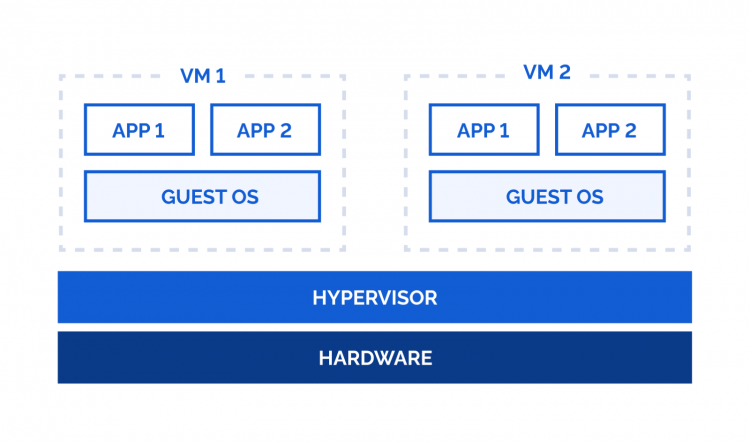
Type 1, native or bare-metal hypervisor
This is a virtualization software that runs directly on physical server hardware without an underlying general purpose operating system. It directly controls the physical hardware and manages guest operating systems.
Type-1 hypervisors interact directly with CPU virtualization extensions (Intel - VT-x, AMD-V, ARM EL2) and physical memory controllers rather than translating through a host kernel.
The hypervisor kernel acts as a lightweight microkernel dedicated exclusively to CPU thread scheduling, memory page management, and routing IO requests between virtual devices and physical hardware.
E.g. VMWare ESXi, Microsoft Hyper-V, Linux KVM
Type 2 hypervisor
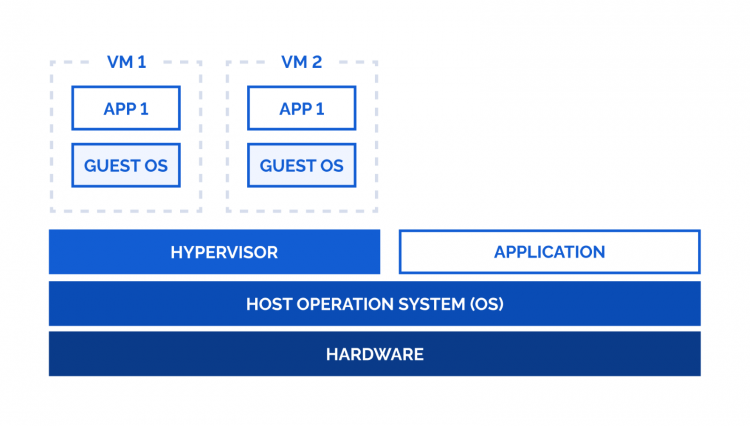
It is virtualization software installed and executed on top of an existing, general purpose operating system.
It relies on the host OS to manage hardware as it runs as a standard user-space application. It requests CPU time, memory, storage access and network packets through the host OS kernel and device drivers. The guest OS schedules its own internal processes, but the host OS must then schedule the hypervisor process among other host desktop apps. When a VM needs to read from disk or send a network packet, the hypervisor translates that request into standard host system calls.
E.g. Oracle VirtualBox, VMware Workstation, QEMU, etc.
Isolation
This isolation is enforced by the hypervisor:
- it intercepts and manages access to real hardware, so VM’s never talk to physical hardware directly.
- Uses hardware assisted virtualization features such as
intel vt-xoramd-vto enforce boundaries at cpu level where each access toring-0goes via this. - Each VM assigns its own virtual address space, virtual disks, and virtual network interfaces.
Note: Unlike traditional hypervisor like kvm or xen which handle a lot of io emulation thus wasting cpu cycles, AWS uses a system called Nitro System in which most of the hardware access mediation is moved onto dedicated cards (nitro cards).
- CPU Virtualization extension such as
intel vt-xoramd-vto isolate cpu state between instances.- Virtual address space handled by
intel vt-xoramd-vextended page tables.- Nitro Card for EBS (Elastic Block Store - network attached storage) handles the encryption and I/O path directly in hardware, bypassing the hypervisor entirely.
- Nitro Card for VPC uses ENA(Elastic Network Adapter) to provide isolation between virtual machines
Pros
- Isolation: Each VM is isolated therefore a crash, malware infection, or misconfiguration in one doesn’t affect the rest.
- Multiple OS support: Allows running any OS as it is independent of the host OS.
- Efficient hardware utilization: Multiple VMs can share one physical machine’s CPU, RAM, and storage.
- Easy snapshots and rollback: VM state can be saved which is useful in backing up and providing rollbacks.
- Portability: A VM (as an image) can be moved between physical hosts or cloud providers relatively easily.
- Cost savings: Fewer physical machines needed, less power, cooling, and space required.
- Scalability: spinning up new VMs is fast compared to provisioning new physical hardware.
- Disaster recovery: VMs can be backed up and restored quickly, and replicated across data centers.
Cons
- Performance overhead: The hypervisor layer adds some CPU, memory, and I/O overhead compared to running directly on physical hardware.
- Resource inefficiency: Each VM needs its own full OS copy, which uses extra disk space, memory, and boot time (its only one time cost).
- Licensing costs: Running multiple OS instances may mean multiple OS/software licenses (looking at you windows).
- Complex management at scale — many VMs means more patching, monitoring, and configuration to keep track of.
- Not 100% isolation-proof: Hackers gonna hack. lookup vm escapes
- Hardware dependency for acceleration: Best performance requires hardware virtualization support (Intel VT-x/AMD-V); without it, VMs run much slower via full software emulation.
- Storage overhead: VM disk images (especially many of them) can consume significant storage space.
Containers
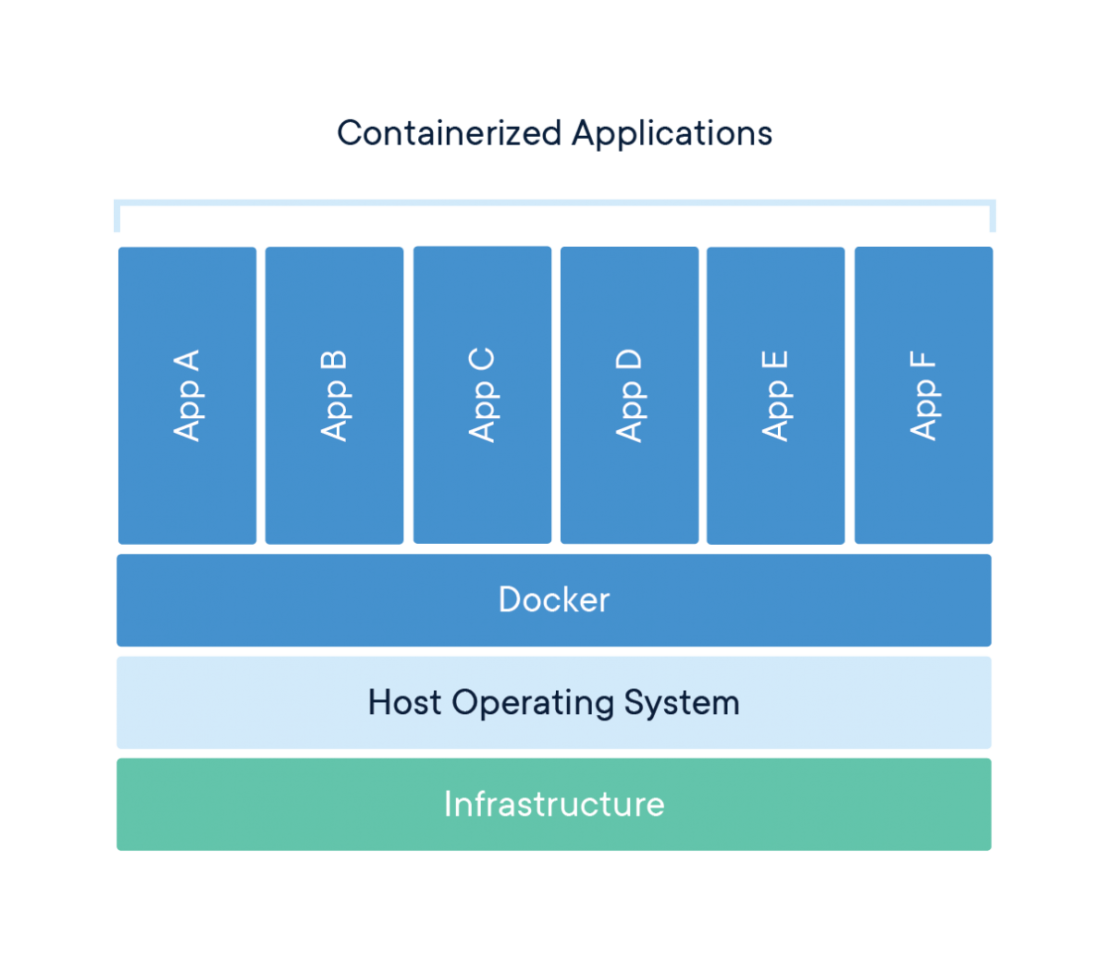
A container is a standard unit of software that packages up code and all its dependencies such as runtime, system libraries, dependencies, configuration, etc into a single lightweight, portable unit. Unlike virtual machines which bring their own operating system kernel, it uses the hosts machine’s kernel but gets an isolated view of the filesystem, network, process tree and resources.
Architecture
Containers in essence are just made with the existing kernel features such as:
- Namespaces: A namespace wraps a global kernel resource so that processes inside the namespace get their own isolated instance of it, while processes outside continue seeing the original
- Process ID: Gives a process tree its own numbering, starting from 1.
- Network Stack: Each net namespace gets its own: network interfaces (except physical NICs, which can only live in one), routing table, iptables/nftables rules, port number space,
/proc/net. - Mount Namespace: Each process gets its own view of the filesystem mount tree. This is the namespace
chrootoperates within to give a container its own root filesystem. Mount namespaces have propagation modes (shared, private, slave, unbindable) controlling whether a new mount in one namespace shows up in another. This gives a container the ability to bind-mount volumes from outside the container. - UTS namespace: It isolates hostname and NIS domain name, making each container to have its own hostname.
- IPC namespace: Isolates System V IPC objects and POSIX message queues and virtual filesystem view.
- User namespace: It maps UIDs/GIDs inside the namespace to a different range outside it. A process can be root inside its own user namespace, meaning it can chown, bind low ports, etc., inside the container while being a completely unprivileged, ordinary user on the host, thus making rootless containers possible.
- cgroup namespace: a process inside a container that reads /proc/self/cgroup sees the full cgroup path from the host’s root, leaking topology information. With a cgroup namespace, the process sees a path rooted at its own cgroup, as if it were
/. - Time namespace: Lets a container have its own offset for CLOCK_MONOTONIC/CLOCK_BOOTTIME, mainly built for checkpoint/restore
- cgroups: cgroups control resource limits and accounting. cgroups v2 lets you cap:
- CPU — cpu.max (quota/period), cpu.weight (relative shares)
- Memory — memory.max (hard limit → OOM kill), memory.high (soft throttle)
- I/O — io.max (bytes/ops per device)
- PIDs — pids.max (prevents fork bombs)
- Union/overlay filesystem: Container images are layered, read-only filesystem diffs i.e. each
RUN/COPYin dockerfile is one layer, addressed by hash. This makes them easily cacheable. At runtime, overlayfs stacks these read-only layers and adds one thin writable layer on top. - Capabilities: These split up root’s power into 40+ discrete privileges that can be granted to a process individually, instead of an all-or-nothing root/non-root split.
- seccomp-bpf: It filters which syscalls a process may even invoke. Docker’s default seccomp profile blocks 40+ syscalls like
ptrace,reboot, loading kernel modules, etc. - AppArmor/SELinux: It adds a further layer restricting file/network access patterns regardless of UID
Pros
- Fast startup: No kernel to boot, a container starts in the time it takes to
fork/execand set up namespaces. - Lightweight: No duplicated guest OS, so a container only costs the memory/disk its own process and layers need.
- High density: Since there’s no per-container kernel, a single host can run hundreds to thousands of containers versus a few dozen VMs.
- Portable images: Layered, hash-addressed images bundle code with all its dependencies.
- Fast, cacheable builds: Unchanged image layers are reused by hash across builds and images, so rebuilds and pulls only transfer what actually changed.
- Efficient resource usage: cgroups let many containers share one host’s CPU/memory/IO with fine-grained accounting and limits, instead of statically reserving hardware per workload.
- Ecosystem and tooling: OCI standardizes images and runtimes, so Docker, containerd, Kubernetes, and various runtimes (
runc,crun,gVisor,Kata) are interchangeable at the API level. - Rootless option: With user namespaces, containers can run without any real root privilege on the host, shrinking the blast radius of a compromised container.
Cons
- Shared kernel: All containers on a host use the same kernel, so a kernel vulnerability (e.g. Dirty Pipe, or a namespace-escape bug) can let a container break out to the host or to sibling containers.
- Weaker isolation than VMs: Namespaces and cgroups isolate visibility and resource usage, not the kernel itself, containers are policy-enforced isolation on one kernel, not hardware-enforced isolation like a hypervisor provides.
- Same OS family only: A container must use the host’s kernel, so you can’t run a Windows container on a Linux host.
- PID 1 pitfalls: A container without a proper init process doesn’t reap zombie processes, and if PID 1 dies the whole container is killed.
- Persistent state is awkward: The writable layer is ephemeral by default; anything not explicitly put in a volume disappears when the container is removed.
- Security hardening is opt-in: Reasonable isolation depends on correctly using capabilities, seccomp, and AppArmor/SELinux
- Networking complexity at scale: veth pairs, bridges, overlay networks, and NAT rules across many containers/nodes (e.g. Kubernetes CNI) add real operational complexity compared to a VM’s simpler virtual NIC model.
Isolates
An isolate is a lightweight, secure execution context inside a single OS process, rather than an OS-level mechanism. Instead of isolating a process from the kernel (like a container) or a whole machine from hardware (like a VM), an isolate isolates one piece of code from another within the same process, using the guarantees of a language VM (V8 for JavaScript/Wasm). Many isolates share one process, one engine instance, and one host OS process footprint, but each gets its own heap, global object, and compiled code.

Architecture
- Own heap per isolate: Each isolate gets its own V8 heap. There’s no shared mutable memory between isolates, so one isolate can’t reach into another’s objects.
- No OS-level namespace/cgroup per tenant: Because isolation happens inside the language VM, there’s no
clone(), no namespaces, no per-tenant process making isolates so much cheaper to spin up than a container or VM. - Snapshot-based startup: A fresh isolate can be created from a pre-parsed, pre-compiled memory snapshot instead of parsing and JIT-compiling code from scratch on every request, cutting cold starts down to low single-digit milliseconds or less.
- Mediated I/O: An isolate has no direct syscall access. Anything that touches the outside world (network fetch, KV/storage access, etc.) goes through APIs the embedding runtime explicitly exposes, so the attack surface is that curated API set rather than the full Linux syscall table.
- Restricted language surface: No
SharedArrayBuffer, no raw pointers, no arbitrary native code as everything runs as JS/Wasm inside the engine’s memory-safety guarantees.
How Cloudflare does it
Cloudflare Workers runs on workerd, a runtime built on the V8 engine.
- Thousands of tenants, one process: Cloudflare deliberately does not give each Worker its own OS process as process isolation would require substantial communication overhead and up to 10x the CPU cost versus running many isolates in a shared process, since each edge machine needs to host thousands of tenants with minimal memory footprint and fast context switching. A dedicated process per tenant would also cost far more memory than the few-megabyte overhead an isolate needs.
- Deploy-time snapshotting: To cut cold starts, Cloudflare does the expensive work once, at deploy time. It creates a V8 isolate, executes the Worker’s top-level code, and snapshots the resulting heap/WebAssembly memory. Every incoming request then just loads that pre-built snapshot to bootstrap a fresh isolate almost instantly, instead of re-parsing and re-initializing code on every request.
- Spectre mitigation without process isolation: Since Spectre-class side-channel attacks rely on precise timing to leak data across a shared CPU, Cloudflare closes that channel directly instead of paying for full process isolation everywhere:
- High-resolution timers are disabled.
Date.now()returns the timestamp of the last I/O event and doesn’t advance during synchronous CPU execution, so a Spectre-style timing loop measures zero elapsed time. - Shared memory and multi-threading are disabled and all work for a single event runs on one thread
- Dynamic process isolation as a fallback: the runtime watches CPU performance counters for the abnormal, pathological access patterns that Spectre-style attacks produce. A Worker that looks suspicious gets rescheduled into its own dedicated OS process at runtime, where it’s protected by standard OS-level Spectre mitigations.
- High-resolution timers are disabled.
- Fresh isolate per deploy, reused across requests: Isolates are reused across multiple requests for efficiency, which is why Cloudflare’s own docs warn against caching secrets/config in module scope.
Pros
- Extremely fast startup: Isolates start in low milliseconds to sub-millisecond time since there’s no kernel boot and no new OS process.
- Very high density: Thousands of isolates can run per machine because there’s no per-tenant kernel or process overhead, just a heap and some bookkeeping inside a shared process.
- Small memory footprint: An idle isolate costs only a few megabytes rather than the hundreds of MB a container’s process needs at rest.
- Narrow, curated attack surface: With no direct syscalls, no filesystem, and no raw sockets, the exploitable surface is whatever API the embedder chose to expose.
- No shared-kernel CVEs to worry about: Because the code never issues syscalls directly, kernel-level container-escape bugs (Dirty Pipe–style, runC-style) simply don’t apply to the isolate boundary itself.
- Good fit for short-lived, bursty workloads: The near-zero cold start makes scale-to-zero and per-request billing genuinely practical, which is awkward with container/VM cold-start latencies.
Cons
- Language/runtime-locked: You can only run what the engine supports i.e. JS and Wasm..
- Isolation quality depends on the engine: The whole security boundary rests on V8 being bug-free.
- Side-channel attacks are a real concern: Sharing one CPU core and cache hierarchy across tenants in the same process makes Spectre-class attacks a live threat, requiring active mitigations (timer coarsening, disabling shared memory, dynamic process isolation).
- No arbitrary filesystem/network access: Anything not explicitly exposed via the embedder’s API isn’t reachable, which is great for security but means porting an existing app (that expects a real filesystem, sockets, subprocesses) often requires rewriting it.
- Limited to the embedder’s execution model: Long-running background threads, native addons, or heavy CPU-bound workloads that need to dodge Spectre-timer restrictions don’t fit the isolate model as naturally as they fit a VM or container.